Team operations platform

The season runs on Matchday.

Rosters, match days, travel, documents and player forms, finally in one place. Built for the people who actually run the season, in any team sport, from academy clubs to national federations.

Download on theApp Store Coming soonAndroid

Free for your players and staff. On iPhone today, Android next, and the web app works everywhere.

One system. The whole season running through it.

Your season lives in twelve spreadsheets, four group chats and one binder. Matchday replaces all of them.

Who it’s for

Built for both sides of the game.

Clubs & academies

One season, every squad.

Rosters that roll over year to year, training weeks players actually see, and match days run from one sheet.

  • Season calendar & weekly templates
  • End-of-season rollover wizard, with a 30-day undo
  • Multi-team players, one identity, one set of documents

Federations & national teams

Windows, call-ups, campaigns.

Bring thirty people from eight clubs to one camp, with every passport checked before the flight list closes.

  • International windows & camps
  • Cross-team call-ups: documents follow the player
  • Travel-document readiness per squad

Players

They just open the app.

Schedule, forms, bookings and sign-offs on their phone. No logins to chase, no spreadsheets to find.

  • Today’s schedule, always current
  • Wellness checks in under two minutes
  • Book physio, treatments & 1:1s
  • Sign policies from the phone

A day in the job

One Thursday, start to finish.

Nobody buys software to admire a feature list. Here is a normal day two weeks before an away trip, and where Matchday actually shows up in it.

06:40

Kitchen table

On the phone

Before anyone else is awake, you know what is broken.

The app opens on what needs a person, not on a dashboard you have to interpret: documents about to expire, forms nobody answered, policies still unsigned. Two passports on the trip squad need chasing today, and one of them cannot wait.

1 passport expired 1 expiring in 24 days 19 wellness answers missing

09:10

The office

At the desk

Plan the week once. It is live before your coffee is cold.

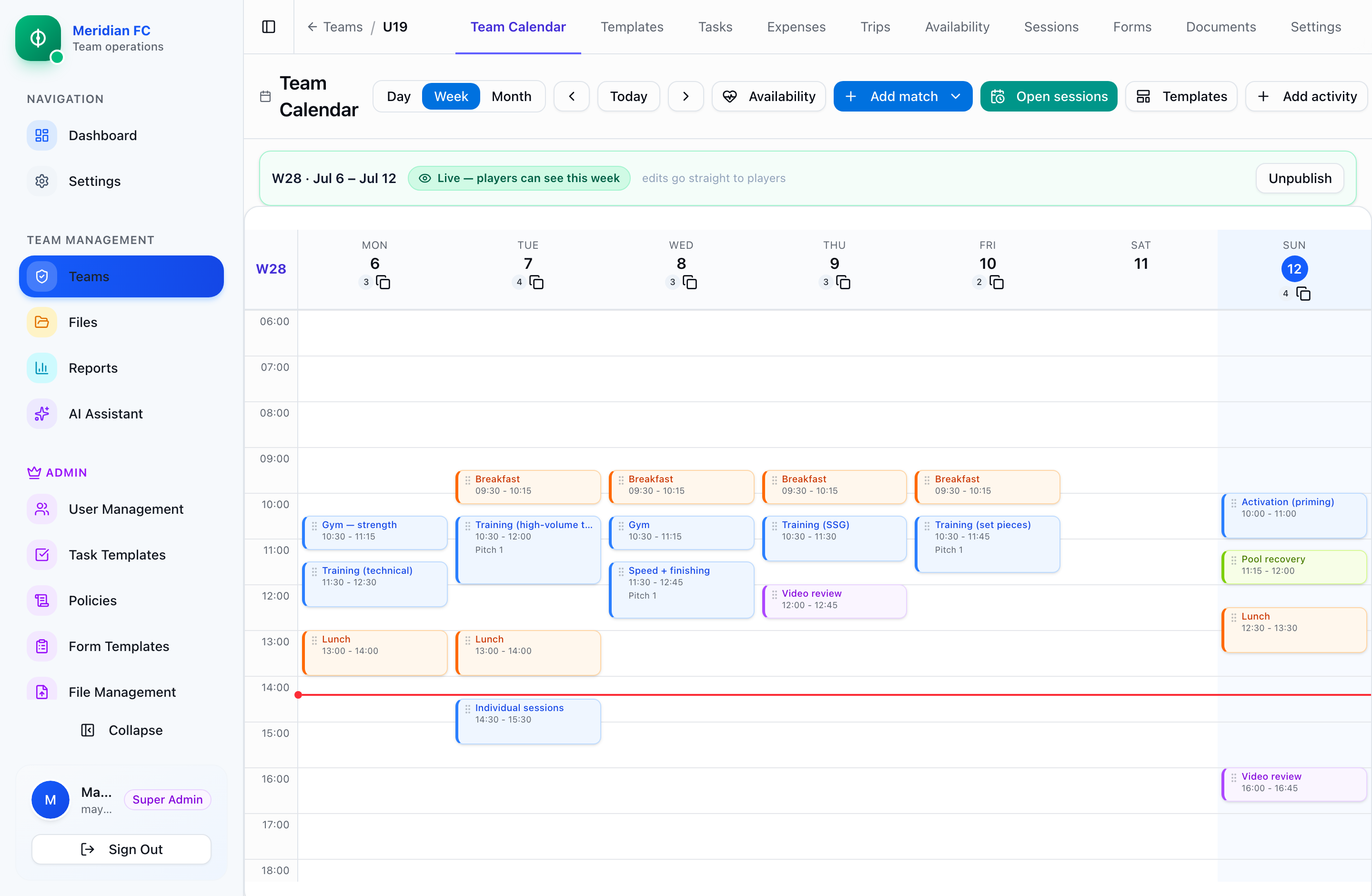
Drag training and gym onto the grid, or stamp the template you use every week. Matches and flights are already on it. Press publish and every player has the same week in their pocket, including the edit you make at four o’clock.

Week published · live to 23 players Template stamped across the block

11:20

Next month’s camp

At the desk

The camp builds itself out of the last trip.

You ran this trip in March. Point the new one at the old one and it recreates the hotel and its rooms on the new dates, the kit list with the ticks cleared, the task list reset to waiting, the squad, and who shared with whom. Rooms that do not exist yet get created, and it tells you which ones.

Hotels, rooms, kit, tasks, squad Roommates re-paired Confirmation numbers cleared

14:05

Before the list closes

At the desk

Twenty-two people, and it names the four who are not ready.

Not a green tick that means nothing. A row per person with a seat out, a seat back, a bed and a passport, and every gap is a link to the screen that fixes it. Two late call-ups have no flight and no room; one passport ran out last month.

20/22 flying 2 people without a room 8 gaps, each one a link

17:30

Pitch 2

On the phone

Attendance without a clipboard, in the rain.

Everyone is present until you say otherwise, so a full session is no taps at all. Mark the two who are not there, pick a reason, and it lands in the season report you will be asked about in June.

Present by default Injury · illness · cross-team duty

21:10

Gate B12

On the phone

Twenty-six names, and the two who are not here.

The gate is not where you open a spreadsheet. Tick people in as they arrive, filter to who is missing, and their number is right there on the row. Two phones ticking at once settle themselves, and a lost signal does not lose the roll call.

24 of 26 checked in Missing (2), tap to call Kit packed 9/12 · loaded 6/12

Every morning

Walk in. Already caught up.

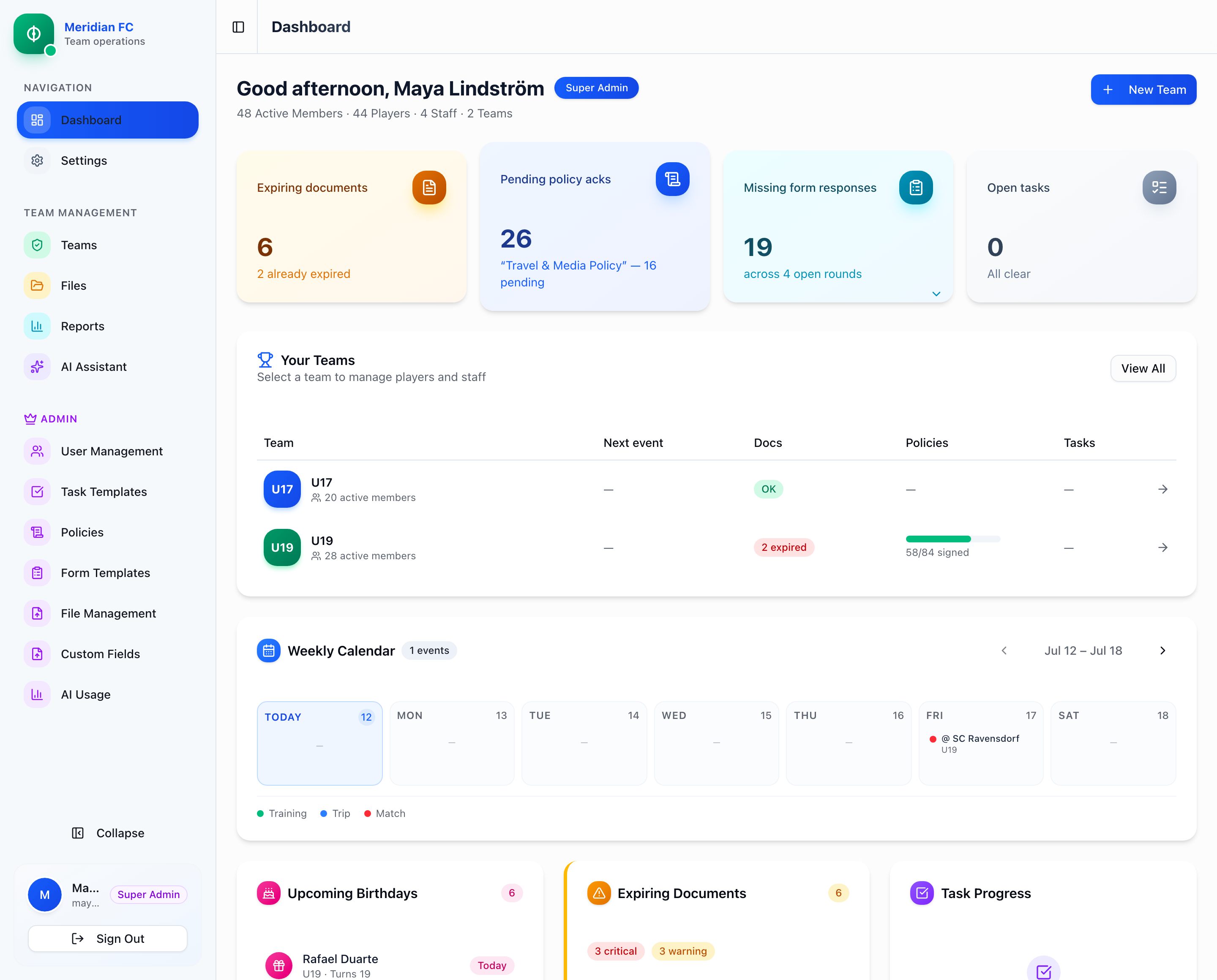
The dashboard triages the whole club before your coffee does: documents about to expire, policies still unsigned, form responses missing, and every team’s week, all on one screen. One click deeper and you’re on the calendar, publishing the week your players will see.

Matchday · Dashboard
Matchday admin dashboard: KPI cards for expiring documents, pending policy acknowledgments and missing form responses, a teams health table and the weekly calendar

Live product, shown with demo club data.

The full tour

Five areas, in the order the season needs them.

Questions, answered

Before you ask.

We run everything on Excel and WhatsApp today. How painful is the switch?

An afternoon, not a quarter. Export your roster to CSV and drop it into the import wizard; columns map automatically (Hebrew headers too), and validation catches problems before anything is saved. Your calendar builds from templates, your first trip can be copied from the last one you ran, and players see the week on their phones the same day.

Who can see what?

Every staff role gets per-feature view/edit permissions: roster, schedule, logistics, documents, forms and more. Sensitive personal data is masked for view-only users, medical answers are gated behind a dedicated permission, and every change lands in an audit trail.

Do players need to manage accounts?

Barely, and you never need to know their email in advance. You send an invite from the roster and the player claims it with whichever sign-in they already use: Google, Apple, or an email address and password with a one-time code. Nothing to install from an IT department, no shared logins. You keep managing the squad list exactly as you do today.

Is there a real mobile app, or a website that pretends to be one?

A real one. Matchday is on the App Store for iPhone, and it is two apps in one binary: players get their schedule, forms, bookings and documents, and staff get the operational half, meaning today’s agenda, attendance, airport roll call, packing ticks, trip expenses from a photographed receipt, and the chase-up lists. Everything else, the authoring and the reporting, lives in the browser on any device. Android is on the way; the web app works there today.

Half our work happens where the signal is bad. What then?

The parts that happen away from a desk are built for it. Roll call and packing ticks record the moment you tapped rather than the moment the server heard about it, so two phones ticking the same list settle themselves rather than overwriting each other, and a tap made in a dead spot is not a tap you have to repeat. Screens you already loaded keep showing what they had instead of going blank.

We’re a federation, with call-up windows and campaigns rather than a club season. Does it fit?

Matchday runs in two modes. Federations get international windows, cross-team call-ups where documents follow the player, campaign-grain seasons and travel-document readiness per camp. Clubs get the season calendar, weekly templates and rollover. Same platform, your shape of the game.

We’re not a football club. Does Matchday fit other sports?

Yes. Matchday is built for team sports, plural: football, basketball, volleyball and handball come out of the box, each with its own score format, squad sizes and matchday vocabulary. The calendar, travel, wellness forms, documents and the player app work the same in every sport; football adds a full play-by-play match timeline, while other sports track score and periods.

Which languages does it support?

The interface ships in five languages (English, German, Spanish, French and Hebrew), and every user picks their own, so your physio can work in Deutsch while a player reads the same schedule in Español. The data layer is fully Unicode, and exports are Hebrew-safe out of the box (yes, including Excel).

How do we get started?

Book a demo below. We’ll walk through your actual workflow, season or windows, then provision your organization, import your rosters with you and get your first week published. You’re not left alone with a login and a manual.
Book a demo

See Matchday
in action.

Tell us about your club or federation. A real person replies, usually within a day, and the demo runs on your workflow, not a slide deck.

Already on Matchday? Log in here →

Prefer email? hello@matchday.dev

No spam, no drip campaign. One email from a human.

Thanks! You’re on the team sheet. We’ll get back to you, usually within a day.